








Thinking about upgrading your yard? You can install smart outdoor lights without needing special skills. These lights make your life easier, add style to your space, and help you feel safer at home. Want to know how lighting can impact security? Take a look:
|
Burglary Timing |
Burglars' Preferences |
Lighting Effectiveness |
|---|---|---|
|
Most break-ins happen between 10 AM and 3 PM |
Burglars avoid homes that look busy |
Some burglars feel lights can be a deterrent |
You can enjoy your outdoor space all year with just a few simple steps.
Key Takeaways
-
Smart outdoor lights make your yard safer and look better. They keep burglars away and make your yard feel welcoming.
-
Pick lights that are waterproof and have color choices. Choose lights with smart controls to make them easy to use and last longer.
-
Plan where you want to put your lights. Focus on places like doors and paths to make your yard safe and nice to look at.
-
Use a simple guide to install your lights. Get the tools you need and make sure your lights work with your smart home system.
-
Use smart features like setting timers and changing colors. These features help you save energy and set the mood for any event.
Choose Your Smart Outdoor Lights
Types and Features to Consider
You have a lot of choices when it comes to smart outdoor lights. Let’s start with a quick look at some of the most popular options in 2024:
|
Product |
Installation |
Light Quality |
Functionality |
Durability |
Value |
|---|---|---|---|---|---|
|
Philips Hue Calla Outdoor Bollard Smart Light |
5/5 |
5/5 |
5/5 |
4.5/5 |
4.7/5 |
|
GE Cync PAR38 Full Color Outdoor Smart Bulb |
5/5 |
4/5 |
5/5 |
4/5 |
4.3/5 |
|
4.5/5 |
5/5 |
5/5 |
4.5/5 |
4.7/5 |
|
|
Govee Outdoor String Lights 2 |
5/5 |
5/5 |
4.5/5 |
5/5 |
5/5 |
|
Philips Hue Festavia String Lights |
4.5/5 |
5/5 |
5/5 |
5/5 |
4.7/5 |
|
Govee Outdoor Ground Lights 2 |
4.5/5 |
5/5 |
5/5 |
5/5 |
4.8/5 |
|
Ring Smart Spotlight Battery |
5/5 |
4/5 |
4.5/5 |
5/5 |
5/5 |
|
Govee Outdoor Wall Light |
4.5/5 |
5/5 |
5/5 |
4.5/5 |
5/5 |
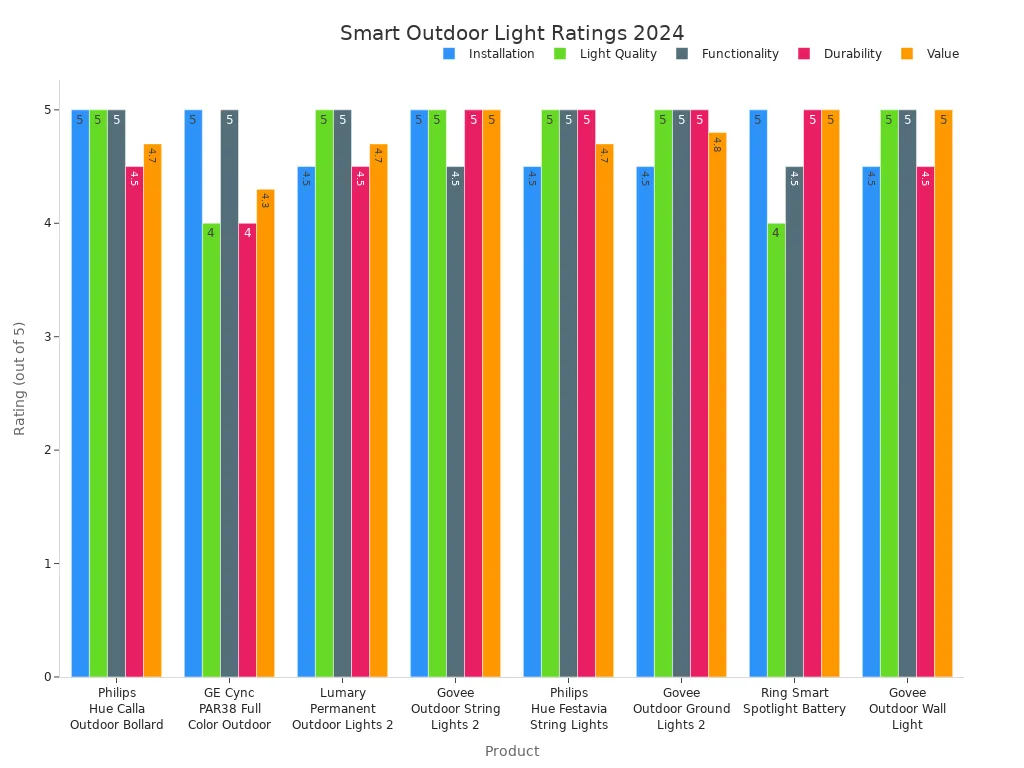
If you want a reliable and easy-to-use option, Lumary Permanent Outdoor Lights 2 stands out. You get a convenient slide-base design that lets you mount and store the lights with ease. The adjustable color temperature ranges from warm amber to cool white, so you can set the mood for any occasion. You can create your own DIY scenes with over 16 million colors and save them for quick access. Smart controls let you use the Lumary app, Alexa, Google Assistant, or a remote. These lights are built for all-weather use, with IP67 waterproofing and tough materials that handle extreme temperatures.
When you pick smart outdoor lights, look for features like waterproof rating, color options, app or voice control, and mounting choices. Brightness matters for safety and style. Connectivity and compatibility with your smart home system make setup and daily use simple. Ease of installation is important, especially if you’re new to outdoor lighting. Scheduling, timers, and voice control add convenience.
Tip: Before you buy, check your Wi-Fi coverage outside and make sure the lights support your smart home system. Verifying compatibility with smart home systems helps avoid headaches later.
Tools and Materials Needed
You don’t need fancy equipment to install smart outdoor lights. Start by gathering necessary tools. Here’s a handy table to help you get ready:
|
Tools/Materials |
Description |
|---|---|
|
Screwdriver |
For securing the mounting brackets. |
|
Drill |
To make holes for the screws. |
|
Wire Strippers |
To prepare the wires for connection. |
|
Voltage Tester |
To ensure the power is off before you start working. |
|
Ladder |
If you're installing lights in high places. |
|
Smart LED Light Fixtures |
The main stars of your project. |
|
Mounting Brackets |
To hold the lights securely in place. |
|
Wiring |
To connect the lights to the power source. |
|
Waterproof Wire Nuts |
To protect the connections from moisture. |
|
Outdoor Smart Power Outlet |
For added safety and functionality. |
You should also check compatibility with your existing systems. This step makes installation smoother and helps your lights work perfectly with your smart home setup.

Step-by-Step Installation Guide
Plan Your Lighting Layout
You want your yard to look great and feel safe at night. Start by walking around your property and looking for spots that need light. Focus on entrances, walkways, patios, and gardens. Think about both safety and style. You might want to highlight a cool tree or make sure your steps are easy to see.
-
Sketch your yard on paper or use a simple app.
-
Mark where you want to place each led fixture.
-
Check that each spot is easy to reach for maintenance.
-
Avoid putting lights behind bushes or trees that block the glow.
-
Make sure you have enough coverage so there are no dark corners.
When you plan your layout, remember to check your Wi-Fi signal in each area. Smart outdoor lights need a strong connection to work well. If you find a weak spot, you can move your router or add a Wi-Fi extender.
Tip: Think about how the light will look from inside your house, too. You want your yard to look inviting from every angle.
Install Smart LED Outdoor Lights
Now you’re ready to install smart led outdoor lights. Gather your tools and materials before you start. Read the instructions that come with your lights. The Lumary Permanent Outdoor Lights 2 make things simple with a slide-base design. You can use the strong adhesive, clips, or screws for mounting. After the holidays, just slide the led string off for easy storage.
Here’s a quick checklist for a smooth install:
-
Download the Lumary app before you begin setting up the lighting system.
-
Lay out your led fixtures and check that you have all the parts.
-
Use a screwdriver or drill to attach the mounting brackets.
-
Snap or slide the led lights into place.
-
Use waterproof wire nuts for wiring the lights safely.
-
Plug the system into an outdoor outlet with GFCI protection.
-
Make sure you are checking power supply requirements for each led fixture.
-
Test each led to see if it turns on and changes color.
If you get stuck, watch a video tutorial. Many brands, including Lumary, offer step-by-step videos that show you exactly how to install smart led outdoor lights. These videos can help you avoid mistakes and make the process less stressful.
Here’s a table of common mistakes and how to avoid them:
|
Common Mistake |
How to Avoid It |
|---|---|
|
Smart Hub Compatibility |
Make sure your led lights work with your smart hub or app before you install. |
|
Inspecting Wiring Connections |
Double-check all wiring and use waterproof connectors for safety. |
|
Ensuring Strong Wi-Fi Signal |
Test your Wi-Fi in the yard and use an extender if needed. |
Safety and Setup Tips
Safety comes first when you install led lights outside. Always turn off the power before you start. Use weather-resistant equipment and make sure your outdoor outlet has a plastic cover and GFCI protection. This will keep you safe if there’s an electrical problem.
-
Wear gloves and safety glasses when you work with wires.
-
Use only outdoor-rated extension cords and plugs.
-
Keep all led connections off the ground to avoid water damage.
-
Test the electrical connections before you finish.
Note: If you ever feel unsure, ask a friend for help or call a professional.
Here’s a quick look at the cost difference between DIY and professional installation:
|
Installation Type |
Cost Aspect |
Benefits/Drawbacks |
|---|---|---|
|
DIY |
Cheaper upfront |
Good for plug-in or solar led lights, but may not last as long. |
|
Professional Install |
Higher initial cost |
Safe, code-compliant wiring, longer-lasting led systems, adds value. |
You can save money with a DIY install, but a pro can make sure everything is safe and up to code. If you want to connect your led lights to a smart hub, a professional can help with compatibility and setup.
When you finish, enjoy your new smart outdoor lights. You can control them with your phone, set schedules, and change colors for any occasion. Setting up the lighting system is fun and rewarding. You’ll love how your yard looks every night.

Connect and Customize Smart Outdoor Lighting
Pair with App and Voice Assistants
You can start connecting the lights by downloading the Lumary app on your phone. Open the app and follow the prompts to add your smart outdoor lighting system. Make sure your phone and the lights are on the same 2.4GHz Wi-Fi network. This step helps avoid connection issues. If you want hands-free control, link your lights to Alexa or Google Assistant. These voice assistants let you turn lights on or off, change colors, or adjust brightness with simple commands.
Here’s a quick look at which voice assistants work with popular brands:
|
Brand |
Voice Assistant Support |
|---|---|
|
Philips Hue |
Alexa, Google, HomeKit |
|
LIFX |
Alexa, Google |
|
Wyze Bulb Color |
Alexa, Google |
|
Cree Connected Max |
Alexa, Google, Siri |
|
Nanoleaf |
All major platforms |
If you run into trouble, check your Wi-Fi signal and keep your router close during setup. Try using an outdoor smart plug for easy power control.
Set Schedules and DIY Scenes
Configuring smart features like schedules and scenes is easy. In the Lumary app, you can set your smart outdoor lighting to turn on at sunset and off at bedtime. You can also create DIY scenes for holidays or parties. For example, set red, white, and blue for Independence Day or a cozy amber for relaxing evenings. The app lets you save your favorite settings for quick use.
-
Program lights to turn on or off at set times.
-
Tap “Rules” in the app to use sunrise or sunset options.
-
Choose from over 55 preset modes or make your own.
Using an outdoor smart plug adds another layer of control. You can automate power to your lights or group them with other devices.
Adjust Brightness and Color
Customizing light settings is fun and practical. You can adjust brightness for a soft glow or full illumination. Change colors to match your mood or event. Lowering brightness saves energy and extends the life of your smart outdoor lights. Studies show that smart outdoor lighting systems can cut energy use by over 50% when you manage brightness and color.
Try configuring smart features like dimming for movie nights or bright white for extra security. Use your outdoor smart plug to quickly turn everything off when you head inside. Remember, compatibility matters—always check your devices work together before you start.
Tip: Place your outdoor smart plug in a weather-safe spot for year-round reliability.

Troubleshoot and Optimize
Common Installation Issues
You might run into a few bumps when setting up your smart outdoor lights. Most problems are easy to fix if you know what to look for. Here’s a table with the most common issues and how you can solve them:
|
Installation Issue |
Description |
Solution |
|---|---|---|
|
Lights won’t connect or keep disconnecting. |
Make sure your phone and lights use the same 2.4 GHz Wi-Fi. Keep your router close. |
|
|
Slow Response |
Lights connect but react slowly. |
Organize lights by room, avoid duplicate names, update firmware. |
|
Weak Wi-Fi Signal |
Lights disconnect or respond slowly. |
Move your router closer, use a Wi-Fi extender, check for obstructions. |
If your outdoor plug isn’t working, try these steps:
-
Keep it away from microwaves or metal objects.
-
Disconnect some devices if your network feels crowded.
-
Press and hold the reset button for five seconds, then set up again.
Tip: Always check compatibility before you start. This helps your lights work smoothly with your smart home hub.
Maximize Energy Savings
Smart outdoor LED lights use much less energy than old bulbs. Take a look at this chart to see the difference:
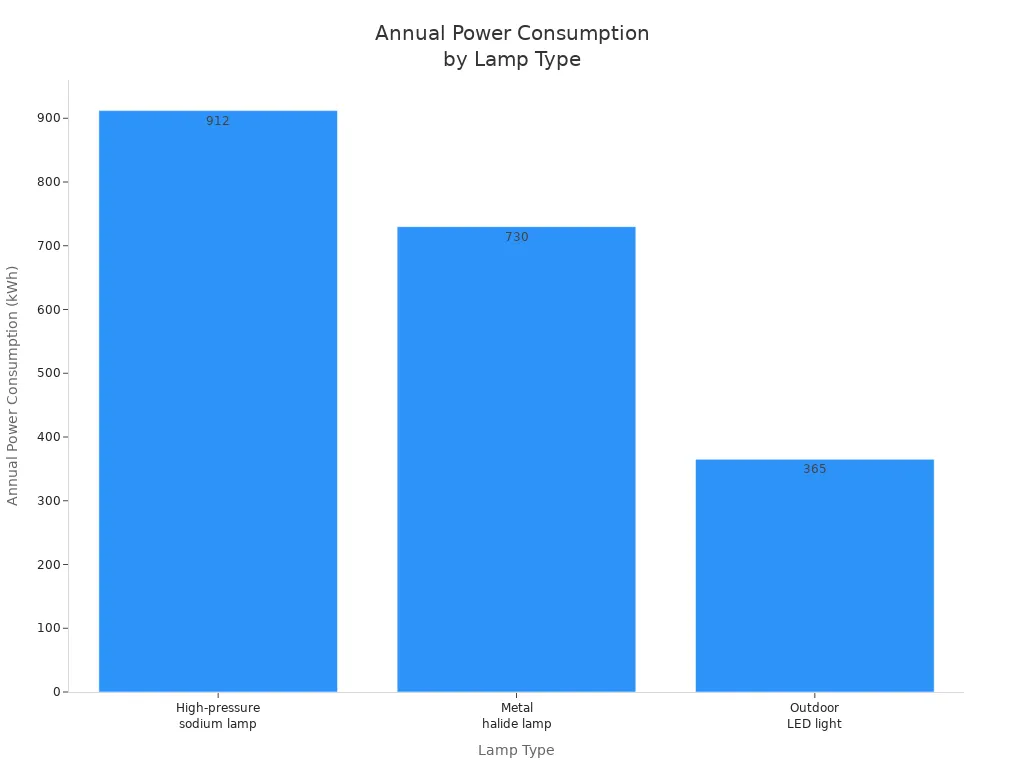
You can save even more by dimming your lights or setting timers. Many cities and schools have cut their lighting costs by up to 75% just by switching to LEDs. Automatic controls and smart scheduling help you use only the light you need. LEDs last much longer, so you won’t have to replace them as often.
-
Replace old fixtures with LEDs for big savings.
-
Use smart features to dim lights and set schedules.
-
Group lights by area for easier control.
Integrate with Other Smart Devices
Integrating with other smart devices makes your outdoor lighting even smarter. You can connect your lights to smart switches or relays for precise control. Set routines, like turning on porch lights when your doorbell rings. Make sure your lights work with your smart home hub for the best experience.
When you connect Lumary Permanent Outdoor Lights 2, you get year-round reliability. These lights are IP67-rated, so they handle rain, dust, and extreme temperatures. They last up to 50,000 hours, giving you peace of mind in any weather.
Note: Integrating your outdoor lights with smart plugs lets you control them from anywhere, set timers, and fine-tune brightness. This makes your yard safer and more comfortable.
You now know how to make your yard better with smart outdoor lights. These lights can make your yard safer and look nicer. They also help you use less energy. Try out different settings and scenes to find what you like best at home.
-
Smart outdoor lights make your house look good and help stop accidents.
-
LED fixtures use less energy and last a long time.
-
You can change the lights to fit any mood or event.
|
Lighting Solution |
Benefit |
|---|---|
|
Path and Walkway Lighting |
Makes walking safer and looks nice |
|
Security and Flood Lighting |
Keeps away intruders, lights big areas |
|
Accent Lighting |
Shows off cool spots, adds style |
Try new kinds of lights or add more to your yard. Smart systems are always improving, so you can use your phone or voice to control them. 🌟

FAQ
How do I connect Lumary Permanent Outdoor Lights 2 to Wi-Fi?
You just need to use the Lumary app. Make sure your phone and the lights are on the same 2.4GHz Wi-Fi network. Follow the app’s steps. The process is quick and easy.
Can I control each light individually?
Yes! You can pick colors and brightness for each light in the Lumary app. This lets you create custom scenes for any event or mood.
Are these lights safe to use in rain or snow?
Absolutely. Lumary Permanent Outdoor Lights 2 have an IP67 waterproof rating. They work well in rain, snow, and even extreme temperatures. You can use them all year.
What should I do if a light won’t turn on?
First, check the power and your Wi-Fi connection. Make sure the app shows the device. If you still have trouble, try resetting the light or check the wiring.

