








Looking for the best Smart Fan for your home in 2026? You have some excellent choices. For example, the Lumary Smart Ceiling Fan with Lights, Dreo CLF521S, TurboPoly Fan 508S, and Vornado OSC84 are all top contenders. Each Smart Fan stands out for its reliable performance, advanced smart features, and energy-saving capabilities. Experts typically evaluate airflow, noise levels, smart technology, and ease of installation when recommending a Smart Fan.
Tip: Make sure you select a Smart Fan that matches your room size and personal preferences.
Check out how quickly Smart Fans are gaining popularity:
|
Metric |
Value |
|---|---|
|
Market Valuation (2026) |
|
|
Market Valuation (2035) |
$12.96 Billion |
|
CAGR (2026-2035) |
14.60% |
|
Key Adoption Driver |
Smart home integration |
With a Smart Fan, you get more than just a cool breeze. These fans offer remote control, automation, and voice command compatibility, making everyday comfort effortless.
Key Takeaways
-
Pick a smart fan that matches your room size. Make sure it fits what you like best. This will help you feel comfortable.
-
Find smart fans with motors that use less energy. This can help you save money on your electric bill. It also helps the environment.
-
Think about fans that are quiet when they run. This is important for bedrooms or places where you study. Quiet fans help keep things calm.
-
Use smart features to control your fan easily. You can use your voice or an app to do this. It makes using your fan more convenient.
-
Look at how easy it is to install the fan. Check the warranty options too. This will help you set up your fan without trouble. It also means you will be happy with it for a long time.

Top Smart Fan Picks
Quick Comparison Table
You want to see how the top smart fans stack up? Check out this handy table. It compares the most important specs, so you can spot the differences at a glance.
Note: Airflow and noise levels matter most for bedrooms and offices. Smart connectivity lets you control your fan with your voice or phone.
Summary of Best Models
You have a lot of choices, but each smart fan shines in its own way. Here’s a quick rundown:
-
Lumary Smart Ceiling Fan with Lights Black
This smart ceiling fan brings style and tech together. You get dual lighting with 16 million colors and a super-bright LED. The brushless DC motor keeps things ultra-quiet, perfect for bedrooms or nurseries. You can control everything with Alexa, Google Home, the Lumary app, or the remote. Installation is a breeze—just four steps.
Common questions from users:-
Can you change the light color with your phone? Yes, you can pick any color or brightness using the app.
-
Does it work with Alexa? Absolutely, just ask Alexa to turn it on or adjust the speed.
-
Is it good for low ceilings? Yes, it’s designed for rooms with 8ft ceilings or less.
-
-
Dreo CLF521S
This model gives you strong airflow and smart features for less money. It’s easy to set up and works well in most rooms. -
TurboPoly Fan 508S
If you want a fan that’s almost silent, this one’s for you. It’s powerful and efficient, great for quiet spaces. -
Vornado OSC84
This high-end fan offers excellent performance and smart controls. It’s ideal for larger rooms and comes with a longer warranty. -
Zafro 42 Smart Tower Fan
Looking for the best tower fans? Zafro 42 stands out for its quiet operation and smart connectivity. It’s perfect for living rooms or offices.
Tip: If you want a smart ceiling fan that’s easy to install and packed with features, Lumary is a top pick.
Smart Fan Reviews
Best Overall – Vornado OSC84
If you want a smart fan that cools your whole room fast, the Vornado OSC84 is a great pick. This fan uses a diagonal airflow pattern. It spreads cool air farther and wider than most fans. You get four speed settings. The fan is tall at 41.3 inches. It can turn up to 130 degrees. The Vornado OSC84 lowers the room temperature by one degree in just 30 minutes. It can be a bit loud at 56.5 decibels, but it gives you strong performance.
Here’s a quick look at what makes the Vornado OSC84 the best overall smart fan:
|
Feature |
Details |
|---|---|
|
Airflow Pattern |
Diagonal airflow for wider cooling |
|
Speed Settings |
4 |
|
Height |
41.3 inches |
|
Weight |
9.7 lbs |
|
Oscillation |
130 degrees |
|
Temperature Decrease |
1 degree in 30 minutes |
|
Noise Level |
Peak of 56.5 decibels |
|
Additional Features |
Basic with 8-hour timer |
You’ll like how this fan moves air in big rooms. Many people say it cools rooms quickly and keeps air moving, even in corners. The design is sleek and modern. It fits well in your living room or office. If you want a fan with great airflow and smart features, the Vornado OSC84 is a strong choice.
Note: The Vornado OSC84 is best if you want whole-room cooling and don’t mind some extra noise for more power.
Best Smart Ceiling Fan – Lumary
Want a smart ceiling fan that does everything? The Lumary Smart Ceiling Fan with Lights Black mixes style, technology, and comfort. This fan has dual lighting with 16 million RGBAI colors. It also has a bright CCT LED light that goes up to 5000 lumens. You can change the brightness from 0% to 100%. You can switch between warm and cool tones. This makes it easy to set the mood for any event.
The Lumary stands out because of its smart controls. You can use Alexa, Google, the Lumary app, or the remote to control the fan and lights. Want to change the color or brightness? Just ask Alexa or Google, or use your phone. You can set schedules and routines. Your fan and lights can work together automatically.
Here’s a table showing why the Lumary Smart Ceiling Fan stands out:
|
Feature |
Description |
|---|---|
|
App Control |
Schedule fan and lights, sync colors to music, remember favorite settings |
|
Voice Commands |
Control with Alexa and Google Assistant |
|
Customizable Lighting |
16 million RGBAI color options, adjustable brightness |
|
Energy Efficiency |
Advanced DC motor saves up to 70% more energy than traditional fans |
|
Scheduling Capabilities |
Set routines for fan and lights |
|
Quiet Operation |
Operates at about 38 decibels, quieter than a whisper |
|
Smart Home Integration |
Connects with other smart devices for seamless automation |
The Lumary uses a brushless DC motor. You get strong airflow with very low noise. It runs at just 38 decibels. This is perfect for bedrooms, nurseries, and study spaces. You save money on your energy bill. The fan uses 70% less energy than older models. The design is sleek and low-profile. It fits well in rooms with lower ceilings.
Check out how the Lumary compares to other smart ceiling fans:
|
Model |
Airflow (CFM) |
Noise Level (dB) |
|---|---|---|
|
Lumary Smart |
5500 |
38 |
|
Dreo CLF521S |
5600 |
40 |
|
Honeywell Carmel |
4500 |
42 |
|
Hunter Crestfield |
3900 |
39 |
|
Hampton Bay Mena |
4700 |
41 |
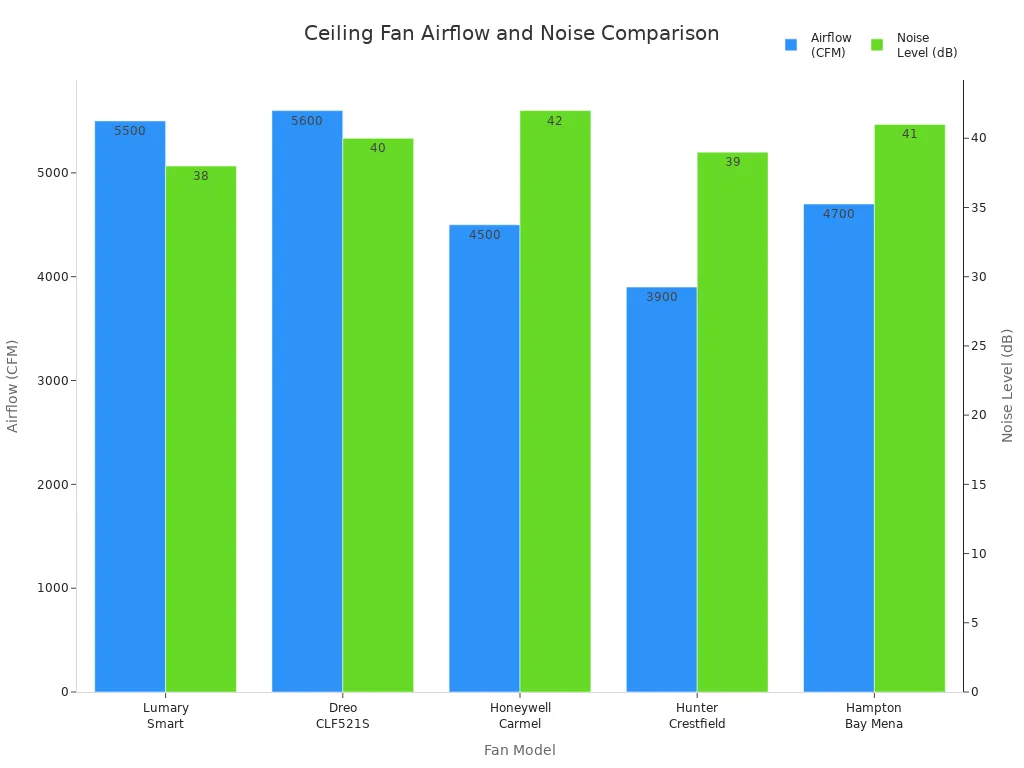
This fan is easy to install, very quiet, and full of smart features. If you want energy efficiency, voice control, and colorful lighting, Lumary is a clear winner.
Tip: The Lumary Smart Ceiling Fan is great if you want to control your fan and lights with your voice or phone, save energy, and enjoy a quiet space.
Best Value – Dreo CLF521S
Want the most efficient fan for your money? The Dreo CLF521S is a smart choice. This fan gives you strong airflow. It works well in large rooms. You get adjustable LED lighting. You can set the mood or brighten your space. The Dreo CLF521S supports Alexa and Google Assistant. You can control it with your voice. You can also use the app for remote control.
Here’s a quick breakdown of what you get with the Dreo CLF521S:
|
Feature |
Dreo CLF521S |
Competitor (Hampton Bay) |
|---|---|---|
|
Airflow Rate |
Up to 5600 CFM |
Similar airflow rate |
|
Noise Level |
Operates below 35dB |
Varies, generally louder |
|
Blade Material |
Lighter materials for efficiency |
Solid plastic, heavier |
|
Smart Home Integration |
Yes, supports major voice assistants |
Limited smart features |
|
Control Options |
App and remote control available |
Limited control options |
|
Energy Efficiency |
High due to lighter blades |
Lower due to heavier blades |
The Dreo CLF521S gives you great airflow and stays quiet, even at high speeds. The lighter blades help save energy. You save money on electricity. The smart home integration is strong. It supports Alexa and Google Assistant. You can control the fan and lights with your voice or the app. It’s easy to adjust settings from anywhere.
Note: The Dreo CLF521S gives you smart features, strong airflow, and energy efficiency at a price that’s hard to beat.
Best Tower Fan – Zafro 42
If you like tower fans, the Zafro 42 is a top pick. This fan is quiet and has a wide oscillation range. It’s perfect for living rooms or offices. You get smart connectivity with Alexa and Google. You can control the fan with your voice. The slim design fits in tight spaces. The fan gives great airflow across the room.
You can use the remote or your phone to control the fan. You can set timers and adjust speed. The Zafro 42 is a good choice if you want style, performance, and smart home integration.
Best Ultra-Quiet – TurboPoly 508S
Need a fan that won’t disturb your sleep or work? The TurboPoly 508S is the best ultra-quiet smart fan. It uses advanced technology to keep noise levels very low. You can enjoy a peaceful environment. The TurboPoly 508S still gives excellent airflow. It’s good for bedrooms, nurseries, or study areas.
You can control the fan with an app or remote. It supports smart home integration for voice commands. The TurboPoly 508S is a solid pick if you want quiet comfort and smart features.
Best for Large Rooms – Dreo CF714S
Have a big space to cool? The Dreo CF714S is made for large rooms. This smart fan has an airflow capacity of 1082 CFM. It can cover up to 110 feet. It turns in all directions with 120° oscillation. You get custom modes. You can set different speeds for different times. The Dreo CF714S works with Alexa and Google Home. You can control it with your voice.
Here’s what makes the Dreo CF714S great for large rooms:
-
Airflow capacity: 1082 CFM
-
Oscillation: 120° omni-directional
-
Coverage distance: up to 110 feet
-
Voice control with Alexa and Google Home
-
Custom modes and routines for different times
You can set routines to turn the fan on or off based on temperature or time. The Dreo CF714S is easy to add to your smart home system. It’s a top choice for large spaces.
Best for Small Spaces – Lumary Smart Ceiling Fan
Need a smart ceiling fan for a small room? The Lumary Smart Ceiling Fan is made for you. This fan is only 20 inches. It fits well in bedrooms, nurseries, or offices with little space. Even though it’s small, it gives strong airflow. It runs quietly at just 38 decibels.
Here’s why the Lumary Smart Ceiling Fan is perfect for small spaces:
-
Compact 20-inch design, ideal for small rooms
-
Quiet operation at 38 dB for comfort
-
Integrated RGBAI LED lighting with 16 million colors
-
Brushless DC motor for energy efficiency and smooth performance
-
Six speed settings for customized airflow
-
Multiple control options: app, remote, touch, and voice
The modern, simple design looks good in any room. You get both air movement and decorative lighting. This is perfect for children’s rooms or family spaces. The Lumary Smart Ceiling Fan gives you flexibility, style, and smart control in a small package.
Tip: For small rooms, pick a fan that is quiet, saves energy, and has flexible controls. The Lumary Smart Ceiling Fan checks all these boxes.

Buying Guide
Key Features
When you shop for a smart ceiling fan or smart tower fan, you want to look for features that make your life easier. Here’s a quick list:
-
Make sure the fan works with your smart home system, like Alexa and Google.
-
Decide if you want built-in smart tech or add-on controllers.
-
Check noise levels and excellent airflow capacity.
You can see the most important features in this table:
|
Feature |
Description |
|---|---|
|
Works with Alexa and Google for easy voice control. |
|
|
Control Options |
Choose wall controls, remotes, or app control. |
|
Fan Size |
Match the fan size to your room for excellent airflow. |
|
Ceiling Height |
Install at the right height for safety and energy efficiency. |
|
Motor Types |
Pick brushless DC motors for energy efficiency and quiet operation. |
|
Noise Levels |
Look for fans with low noise and stable operation. |
Types of Smart Fans
You have lots of choices. Smart ceiling fans are great for bedrooms and living rooms. Smart tower fans work well in offices or tight spaces. The best tower fans give you excellent airflow and easy control. Here’s a chart showing user ratings for popular models:
Smart Controls
Smart fans let you control them with your phone, app, or voice. Wi-fi lets you manage the fan from anywhere. Alexa and Google Assistant give you voice control support. You can set schedules, adjust speed, and change lighting. App control makes it easy to customize settings. Multi-user access means everyone in your home can control the fan.
Motor & Performance
Brushless DC motors help your fan run quietly and last longer. These motors boost energy efficiency and reduce noise. You get up to 95% efficiency and a lifespan of 50,000 to 100,000 hours. Fans with these motors deliver excellent airflow and smooth performance.
Energy Efficiency
Smart fans save energy. Fans with brushless DC motors use 28–35 watts. Traditional fans use 70–80 watts. You can save between 50% and 70% on your energy bill. Energy efficiency matters for both your wallet and the planet.
Noise Levels
You want a fan that stays quiet. Nearly silent fans run at about 20 dBA. A soft hum is around 35 dBA. Whisper-quiet fans for homes operate between 40–52 dB. For bedrooms, pick a fan under 50 dB.
Installation Tips
Pick a fan that fits your room size and ceiling height. Most smart ceiling fans, like Lumary, offer easy installation with step-by-step videos. If you have questions, check the app or ask Alexa and Google for help. Common questions include how to change light colors, set schedules, or connect to wi-fi.
Tip: Always match your fan type to your room and needs. Smart fans with app control, Alexa and Google Assistant, and energy efficiency features make life easier.
Choosing Your Smart Fan
Room Size & Fan Type
You want your fan to fit your space just right. Start by measuring your room. For small rooms up to 75 square feet, a smart desktop fan or a fan with a blade span of 29 to 36 inches works best. Medium rooms need a blade span of 36 to 42 inches. Large rooms call for 44 to 50 inches, and extra-large spaces need 50 inches or more. If your ceiling is under 8 feet, pick a low-profile or hugger fan. These fans sit close to the ceiling and work well in tight spots. For higher ceilings, use a downrod to set your fan at the perfect height. Always try to mount your fan in the center of the room, at least 7 feet above the floor and 18 inches from the walls. This setup gives you the best airflow and comfort.
Budget Tips
You don’t have to spend a fortune to get a great smart desktop fan or smart ceiling fan. Look for an affordable smart fan that fits your needs. Check the initial cost, including installation. Many affordable fans use energy-efficient motors, so you save money on your electric bill. Over time, using a fan instead of air conditioning can lower your utility bills. You can find affordable smart fan options in many styles, so you don’t have to give up looks for price. Many energy-saving fans also come with warranties, which means you get value and peace of mind.
|
Aspect |
Details |
|---|---|
|
Price of fan and installation |
|
|
Energy Efficiency |
Affordable fans often use less electricity |
|
Long-Term Savings |
Fans reduce air conditioning costs |
|
Aesthetic Appeal |
Many styles available, even for affordable fans |
|
Warranties |
Many affordable smart fans include warranties for extra value |
Common Mistakes
You want to avoid common mistakes when picking your smart desktop fan or smart ceiling fan. Here are a few things to watch out for:
-
Don’t forget to check your room size and ceiling height. If you skip this, you might get poor airflow or lighting.
-
Make sure you use the right light bulbs. Old or wrong bulbs can waste energy and give you bad lighting.
-
Think about how the light spreads. Bad light placement can cause glare or dark spots.
-
Always check if the fan works with your home’s wiring and controls. If you skip this, you might have trouble installing your affordable smart fan or using all its features.
Tip: Take a few minutes to measure your space and check your wiring before you buy. This simple step can save you time and money!
You have plenty of smart fan options for your home. The Lumary Smart Ceiling Fan with Lights Black stands out for its colorful lighting, quiet motor, and easy voice control. Remember to pick a fan that fits your room size and needs. Use the reviews and buying guide to help you decide.
Common question: Can you control the Lumary fan with your phone? Yes, you can use the app for full control.
Want more tips? Check out our links for extra resources!
FAQ
How do you change the light color on the Lumary Smart Ceiling Fan?
You can use the Lumary app on your phone. Just tap the color wheel and pick any shade you like. You can also ask Alexa or Google to change the color for you.
Can you control the Lumary fan when you are not at home?
Yes! As long as your fan is connected to WiFi, you can use the Lumary app to control it from anywhere. Turn it on, off, or adjust settings even if you are out.
Is the Lumary Smart Ceiling Fan hard to install?
No, you can install it yourself. The fan comes pre-assembled. Just follow the four simple steps in the video guide. Most people finish in less than an hour.
Does the Lumary fan work with Alexa and Google Home?
Absolutely! You can use voice commands to turn the fan on or off, change speeds, or adjust the lights. Just link your fan to Alexa or Google Home in the app.
What makes the Lumary fan good for bedrooms or nurseries?
The fan runs very quietly—only 38 decibels. That is softer than a whisper. You get gentle airflow and soft lighting, so you can sleep or relax without noise.

